Vibe Coding Explained: A Practical Beginner’s Guide to Building Software with AI
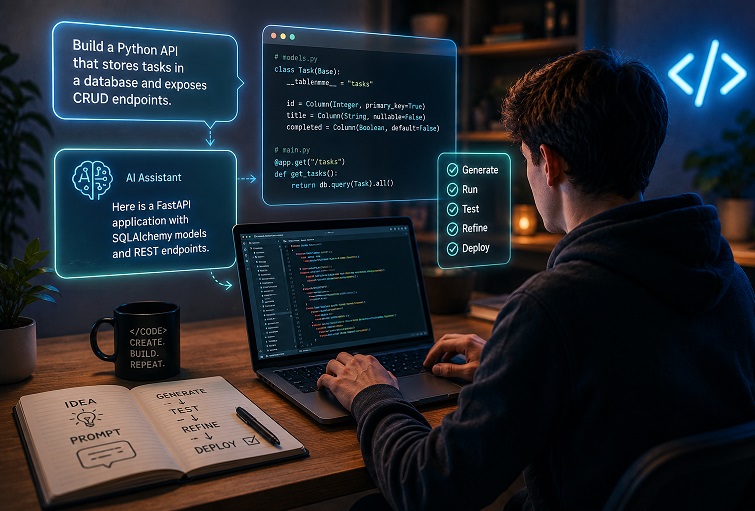
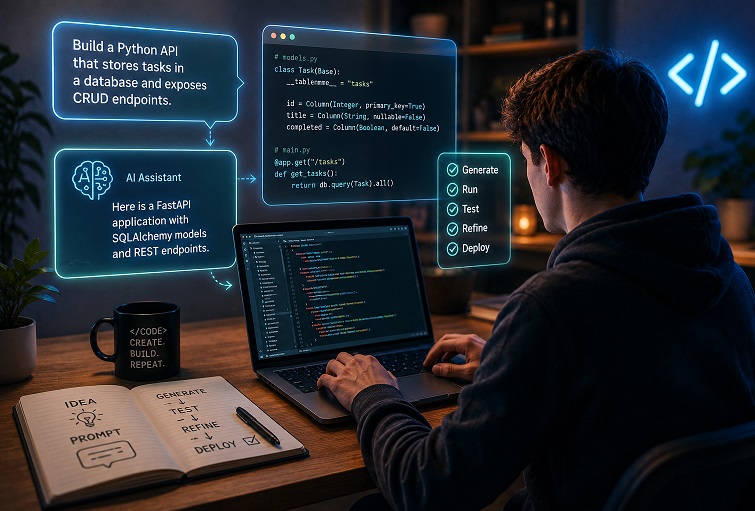
ProgrammingArtificial intelligence has changed the way developers write software. Instead of beginning every project with an empty editor, many programmers now start by describing their goals in plain language and letting an AI assistant generate an initial implementation.
This workflow has become widely known as vibe coding. Although the name is informal, the concept is becoming increasingly common across personal projects, startups, and even professional engineering teams. Modern AI assistants can generate functions, scaffold entire applications, explain unfamiliar APIs, and help debug complex problems in seconds.
Despite the excitement surrounding AI-assisted development, vibe coding is often misunderstood. Some believe it eliminates the need to learn programming, while others dismiss it as little more than autocomplete. The reality lies somewhere in between.
This guide explains what vibe coding actually is, how it differs from traditional software development, which tools support it, where it provides the most value, and how beginners can use it to become better developers instead of becoming dependent on AI.
Understanding Vibe Coding
Vibe coding is a development workflow where natural language becomes the primary interface for writing software. Rather than manually implementing every component from scratch, you explain the desired behavior, and an AI model generates a starting solution.
Instead of thinking first about syntax, you begin with the problem:
“Create a REST API that stores customer orders in PostgreSQL.”
or
“Build a React dashboard that displays sales metrics using Chart.js.”
The AI converts these instructions into executable code, after which you review, modify, test, and improve the implementation.
The important distinction is that AI generates drafts, not finished software. The developer remains responsible for understanding the code, verifying correctness, and making design decisions.
Successful vibe coding is therefore an iterative collaboration rather than a one-time request.
Why AI-Assisted Development Has Become Popular
Several factors have contributed to the rapid adoption of AI programming assistants.
Large language models have become significantly better at understanding programming languages, software architecture, documentation, and common development workflows. At the same time, developers increasingly work across multiple languages, cloud platforms, frameworks, and APIs, making instant contextual assistance extremely valuable.
For beginners, AI reduces the frustration of getting started.
For experienced developers, it removes repetitive work such as:
- Creating project scaffolding
- Writing configuration files
- Generating CRUD operations
- Producing test cases
- Creating documentation
- Explaining unfamiliar libraries
Instead of spending time on boilerplate, developers can focus on solving business problems.
How the Vibe Coding Workflow Actually Works
Although different tools provide different interfaces, the underlying workflow is remarkably consistent.
Step 1: Define the objective
Everything begins with a clear description of the problem.
Instead of asking:
Build me an application.
Provide enough context:
Create a FastAPI application that allows authenticated users to upload CSV files, validates the data, stores it in PostgreSQL, and exposes summary statistics through REST endpoints.
The more context the AI receives, the better the generated solution.
Useful information includes:
- programming language
- framework
- deployment target
- expected inputs
- expected outputs
- performance constraints
- coding style
Step 2: Generate an initial implementation
The AI creates a first version of the code.
Treat this output exactly as you would treat code written by another developer.
It may be:
- mostly correct
- incomplete
- inefficient
- insecure
- outdated
- based on incorrect assumptions
Rarely is the first version production-ready.
Step 3: Execute the code
Running the generated code immediately is essential.
Many beginners skip this step and continue asking for additional features before verifying the existing functionality.
Instead:
- compile it
- run unit tests
- execute the application
- inspect logs
- verify outputs
Small mistakes become much easier to fix before additional complexity is introduced.
Step 4: Refine through conversation
Unlike traditional code generators, modern AI assistants support continuous interaction.
You might ask:
- explain this function
- optimize memory usage
- convert synchronous code to asynchronous
- improve readability
- remove duplicated logic
- add error handling
- support pagination
Each iteration improves the overall solution.
AI Tools Used for Vibe Coding
The ecosystem now includes several categories of AI development tools, each optimized for different workflows.
Conversational assistants
General-purpose AI systems such as ChatGPT, Claude, Gemini, and similar models work through natural language conversations.
They excel at:
- explaining concepts
- generating code examples
- debugging errors
- comparing technologies
- designing algorithms
These tools are particularly useful while learning new programming languages or experimenting with unfamiliar frameworks.
IDE assistants
Integrated development environments increasingly include AI directly inside the editor.
These assistants analyze nearby code and provide:
- inline completions
- automatic refactoring
- documentation generation
- function implementations
- code explanations
Because they understand the surrounding project, they often require shorter prompts than standalone chat applications.
Autonomous coding agents
A newer generation of AI tools can work across entire repositories rather than individual files.
These systems can:
- inspect project structure
- create multiple files
- update configurations
- execute tests
- fix compilation errors
- iterate automatically
While impressive, they still require human supervision. Large architectural changes can easily introduce unintended side effects.
Local language models
Some developers prefer running language models locally for privacy or offline development.
Platforms such as Ollama, LM Studio, and similar tools allow AI-assisted development without sending source code to external servers.
This approach is particularly attractive when working with confidential codebases or regulated industries.
Writing Prompts That Produce Better Code
Prompt quality has a direct impact on code quality.
The most effective prompts provide enough information to remove ambiguity without overwhelming the model.
Good prompts usually specify:
- programming language
- framework
- project goal
- expected behavior
- limitations
- preferred libraries
- coding conventions
For example, instead of asking:
Sort this data.
A stronger prompt would be:
Write a Python function that sorts a list of customer records by purchase date, handles missing values gracefully, and returns the result without modifying the original list.
Concrete examples often improve accuracy even further.
Learning While Using AI
One of the biggest misconceptions is that vibe coding encourages developers to avoid learning programming.
In reality, the opposite can happen.
Instead of copying code from random forum posts, beginners can ask the AI questions such as:
- Why was this algorithm chosen?
- What is the time complexity?
- Could recursion be replaced with iteration?
- How does dependency injection work here?
- What design pattern is this?
Used this way, AI becomes an interactive programming tutor.
The key is to understand the generated solution before relying on it.
Debugging AI-Generated Code
AI can produce code that looks professional while containing subtle logical flaws.
Syntax errors are usually the easiest problems to solve.
Logic errors are much harder.
Examples include:
- incorrect calculations
- race conditions
- missing validation
- inefficient database queries
- security vulnerabilities
- improper exception handling
When debugging, provide the AI with precise information rather than vague descriptions.
Instead of saying:
It doesn’t work.
Include:
- stack traces
- console output
- expected behavior
- actual behavior
- relevant code snippets
This dramatically improves the quality of suggested fixes.
Common Mistakes Beginners Make
Assuming generated code is always correct
AI is capable of producing convincing but incorrect implementations.
Every generated function should be reviewed before becoming part of a project.
Building too much at once
Requesting an entire e-commerce platform in one prompt rarely produces maintainable code.
Breaking projects into small components leads to better results.
Ignoring exceptional cases
Generated solutions often focus on the happy path.
Developers still need to consider:
- invalid input
- missing files
- network failures
- authentication errors
- empty datasets
- concurrent requests
Installing unnecessary dependencies
AI sometimes introduces libraries for problems that standard language features already solve.
Reducing dependencies makes applications easier to maintain and more secure.
Neglecting project organization
As applications grow, maintaining consistent architecture becomes increasingly important.
AI performs better when the project itself follows predictable structure and naming conventions.
Where Vibe Coding Delivers the Most Value
AI-assisted development excels when speed and experimentation matter more than optimization.
Common use cases include:
Rapid prototyping
Testing business ideas before investing significant development time.
Learning unfamiliar technologies
Generating practical examples for frameworks, APIs, or programming languages.
Internal automation
Creating scripts that automate repetitive tasks.
Boilerplate generation
Producing repetitive project setup code.
Documentation
Generating README files, API documentation, and code comments after implementation.
In these scenarios, AI often reduces hours of work to minutes.
Situations Where AI Should Not Be Trusted Blindly
There are still many domains where human expertise remains essential.
Large enterprise systems
Complex applications contain interactions that exceed the context available to current language models.
Security-sensitive software
Authentication systems, payment platforms, healthcare software, and cryptographic implementations require expert review regardless of how the code was generated.
Performance-critical applications
AI generally favors readable implementations over highly optimized ones.
Systems with strict latency requirements often require manual optimization.
Long-term collaborative projects
Teams benefit from shared architecture, coding standards, and design reviews.
AI should support those practices rather than replace them.
Vibe Coding and Traditional Programming
Some discussions present AI-assisted development as a replacement for traditional programming.
That framing is misleading.
The two approaches complement one another.
Traditional software engineering provides:
- architecture
- algorithms
- debugging skills
- testing practices
- maintainability
- system design
Vibe coding accelerates implementation by automating repetitive work.
The strongest developers combine both.
They understand software deeply enough to recognize good AI suggestions while rejecting poor ones.
Security and Responsible AI Usage
Using AI responsibly means treating generated code like any third-party contribution.
Before committing code, developers should verify:
- correctness
- security
- licensing
- maintainability
- compliance
Avoid placing sensitive information into public AI services.
Never include:
- production credentials
- customer databases
- API keys
- proprietary source code
- confidential business documents
Generated code should also undergo the same review process as manually written code, including testing, static analysis, and security scanning.
Developing AI Literacy
Modern software engineering increasingly involves collaborating with AI systems.
Employers are beginning to value developers who know how to:
- formulate effective prompts
- verify generated implementations
- recognize hallucinations
- evaluate architectural trade-offs
- integrate AI into existing workflows
These abilities complement, rather than replace, programming fundamentals.
Developers who understand both software engineering principles and AI-assisted workflows are likely to remain productive as development tools continue to evolve.
Final Thoughts
Vibe coding represents a shift in how software is created, but not in what makes software reliable. AI can dramatically reduce the time required to prototype ideas, explore unfamiliar technologies, and eliminate repetitive coding tasks. It cannot replace careful design, debugging, testing, or engineering judgment.
For beginners, the best approach is to treat AI as an experienced programming partner rather than an oracle. Ask questions, request explanations, inspect every generated solution, and experiment with small projects before tackling larger systems.
The future of software development is unlikely to be entirely manual or entirely AI-driven. Instead, successful developers will combine strong technical foundations with the ability to work effectively alongside increasingly capable AI tools. Those who learn both disciplines today will be well positioned for the next generation of software engineering.